Increasing marketing visibility for an open source platform
Shipped features for Excalidraw, an open source whiteboard tool. The marketing KPI: grow the share of
exports that carry visible attribution, to increase the platform's visibility and support growth. Worked
as UX researcher and product designer inside a shared GitHub repo with three other contributors. Led
product design and ideation on subtle UX changes including QR codes, default credit line, and a short opt-out
survey. Also contributed UX edits to the export-tracking dashboard built by team to measure the KPI.
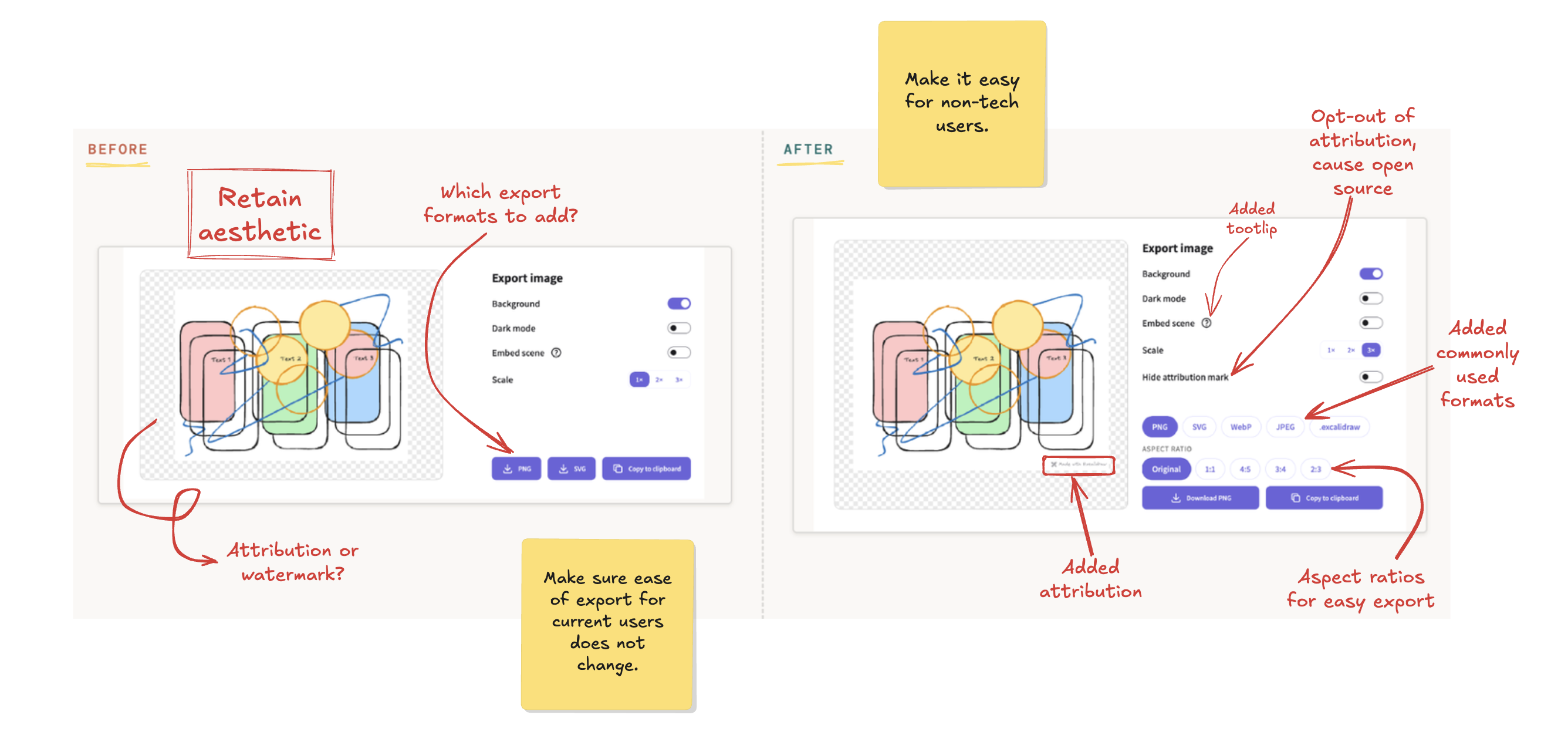
Export dialog, before and after: The notes mark what changed and why. The credit line is on by
default and easy to turn off, with a quick survey.
01 · The Brief
A marketing KPI that the existing analytics could not measure
The stakeholder was Excalidraw's Head of Marketing, played by a Pursuit staff member. Their KPI was
brand visibility rate: the share of exported or shared drawings that carry visible
Excalidraw attribution.
Two constraints shaped the work. First, Excalidraw is local-first. There are no accounts,
and no server ever sees a drawing. Any idea that needed a login, a database or a tracked user was ruled out.
That is why the plan relies on small, transparent, optional UX changes.
Second, there was no baseline. Existing analytics couldn't tell whether an export carried
attribution, so there was no clean export rate. Rebuilding the export dashboard around this KPI became part
of the deliverables.
02 · Research
Where exports go, and what competitors do
Most Excalidraw drawings do not leave through a "File > Export" menu. They leave as a copy-pasted PNG,
dropped straight into a GitHub pull request, a README, a blog post, or a slide. Any attribution that only
lived inside an export dialog, or behind an opt-in toggle, would miss most of the real usage.
A quick competitive scan
Tool
Free-tier export attribution
Miro, Whimsical, Napkin.ai
Attribute on the free tier
tldraw.com, FigJam, draw.io
No watermark on export
Canva
Watermarks only when premium elements are used
Loom
Badge on nearly every free video
Loom puts its badge on nearly every free video automatically, which is why it works. But Loom is a private,
commercial product, and it later charged people to remove the badge. Users called that a "tax." Excalidraw is
open source and free, so that would go down even worse here. My rule for this project: the credit is on by
default, but turning it off always stays free.
User Stories
portrait
Developer
Lola is a developer, who wants to drop a clean diagram
into a pull request or README in seconds, so that reviewers get context without a screenshot tool or extra
editing. She has used Excalidraw for years and likes its no-pressure, local-first approach. If that
changed, she would switch quickly.
portrait
Teacher
Mr. Smith is a teacher with no tech background, who wants to
export a drawing for a class slide in one step, and turn off anything he doesn't understand
without getting stuck. He doesn't use Excalidraw yet and hears about FigJam and Miro instead. He would try
it if it were easy for non-technical people to navigate, and if he could export in different formats and
aspect ratios for slides.
portrait
Student
Camila is a student preparing for system design interviews, who wants
to share diagrams with her study group and on LinkedIn, so that others see her thinking.
She is happy to credit Excalidraw, and her friends would rather back an open source tool than a private
one. But she can't tell how to export at a set aspect ratio, and her homework needs to look consistent.
Strategy: grow the base you already have
The direction we chose was to capture more visibility from Excalidraw's existing, engaged developer base,
rather than build new features to chase a new segment like classrooms. Formal use in education was ruled out
early. It needs procurement approval, stricter privacy handling, and classroom features Excalidraw does not
have. Putting the same effort into the audience already producing shareable drawings every day was the
higher-leverage bet.
Teachers and students who do find their way here still matter, whether they are tech students or non-technical
tutors. So we made exporting easier for them, with more formats and aspect ratios. That gives them more ways
to export and more reasons to keep using the tool.
03 · Design
Scoping the Work
The plan favored small, quiet signals that add up, rather than one loud watermark, like a credit line in the
export margin by default, a QR code on shared collaboration links, and a survey that only appears if someone
turns attribution off. Below is how they were ranked.
Priority
Features
P0Core to the KPI
Default export credit, in the margin
Opt-out toggle and 4-question survey
Export tracking dashboard, the baseline the KPI needs
P1Supports the KPI
More export formats and social aspect ratios
QR code on collaboration links
Embed frame branding
File-type icon
P2Next iteration
Share straight to Pinterest. Pinterest's pin flow needs a public image URL, and
Excalidraw has no image hosting, on principle, because it is local-first. Building it honestly would
have meant adding a hosting backend and new privacy decisions.
The mark sits in the margin, not over the drawing. An overlay could cover what the user
drew, and the brief rules that out. The cost is a thin strip of whitespace on exports.
It is an attribution mark, not a watermark. "Watermark" implies covering the drawing, so
the toggle reads "Hide attribution mark."
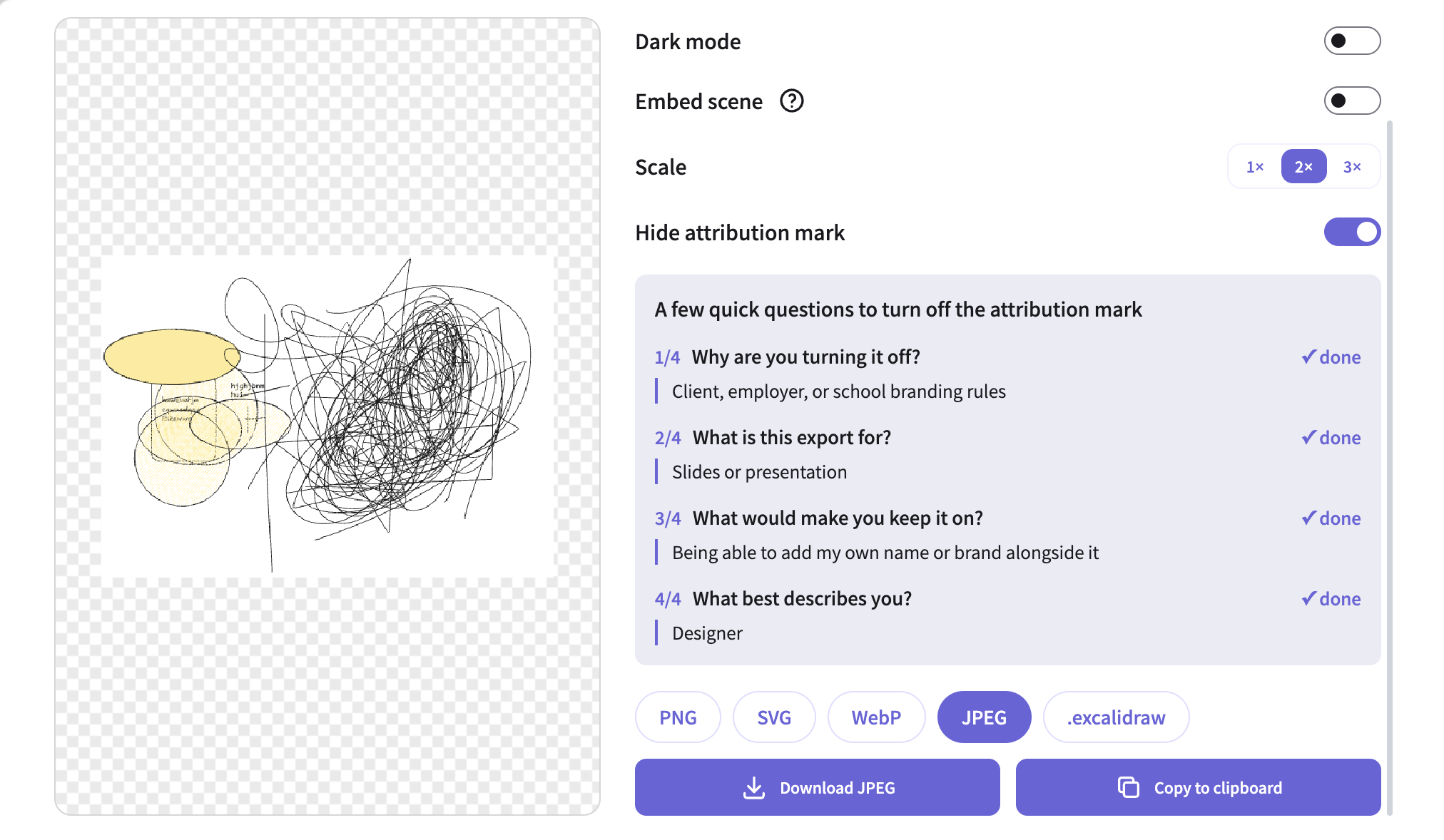
Removal is free, but gated by a short survey. Paid removal is Loom's model, and users
called it a tax. A four-question survey, under 30 seconds, turns every opt-out into design feedback.
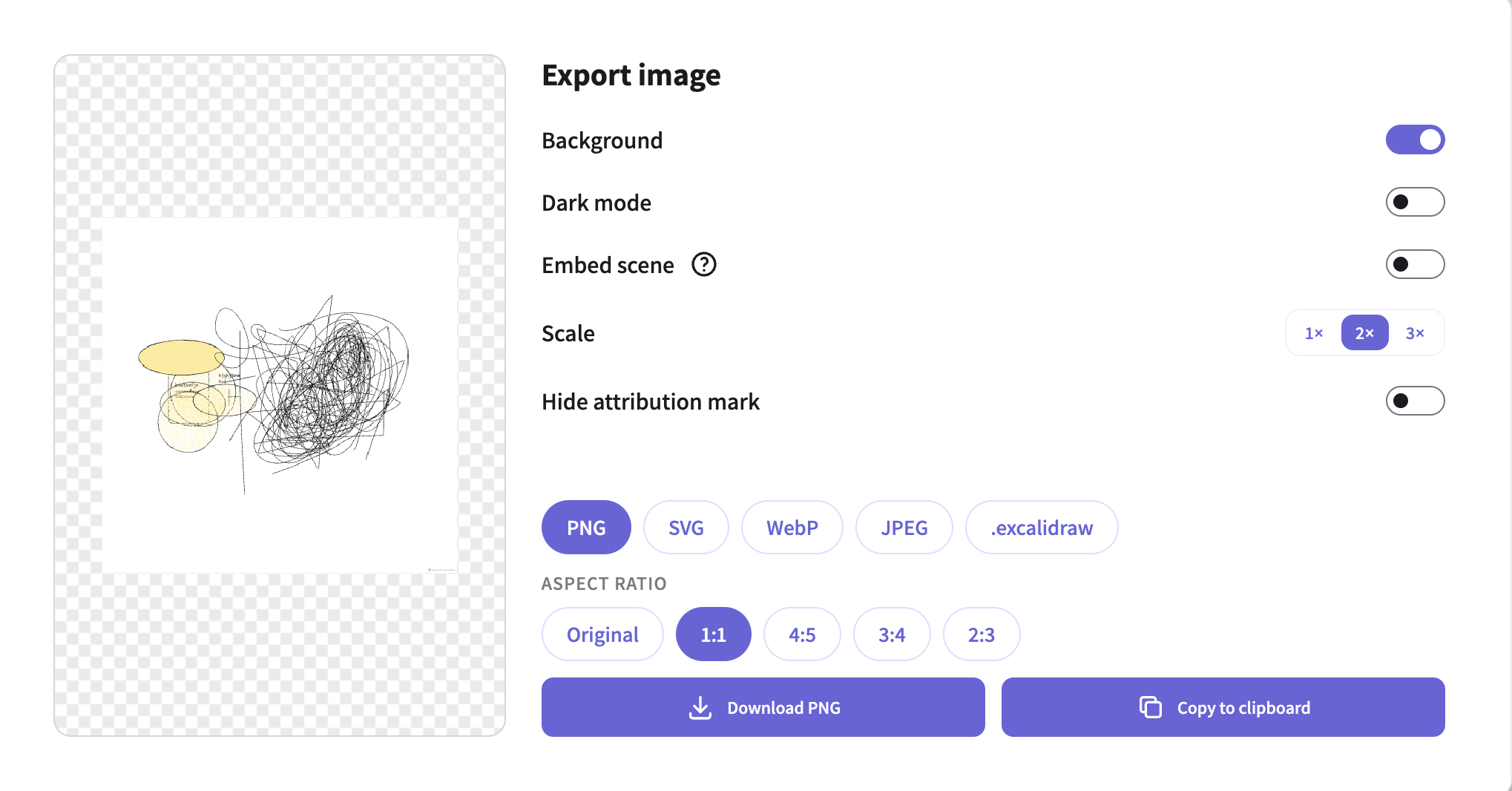
Attribution on
The default. The mark sits in the export margin, and the format and
aspect ratio pills are below.
→
Attribution off
After the four-question survey. The mark is hidden, and each answer stays
visible.
Opt-out lasts 30 days, then lapses. A permanent opt-out loses that visibility for good,
and a reset every session repeats the Loom complaint. Thirty days wins some visibility back without
nagging.
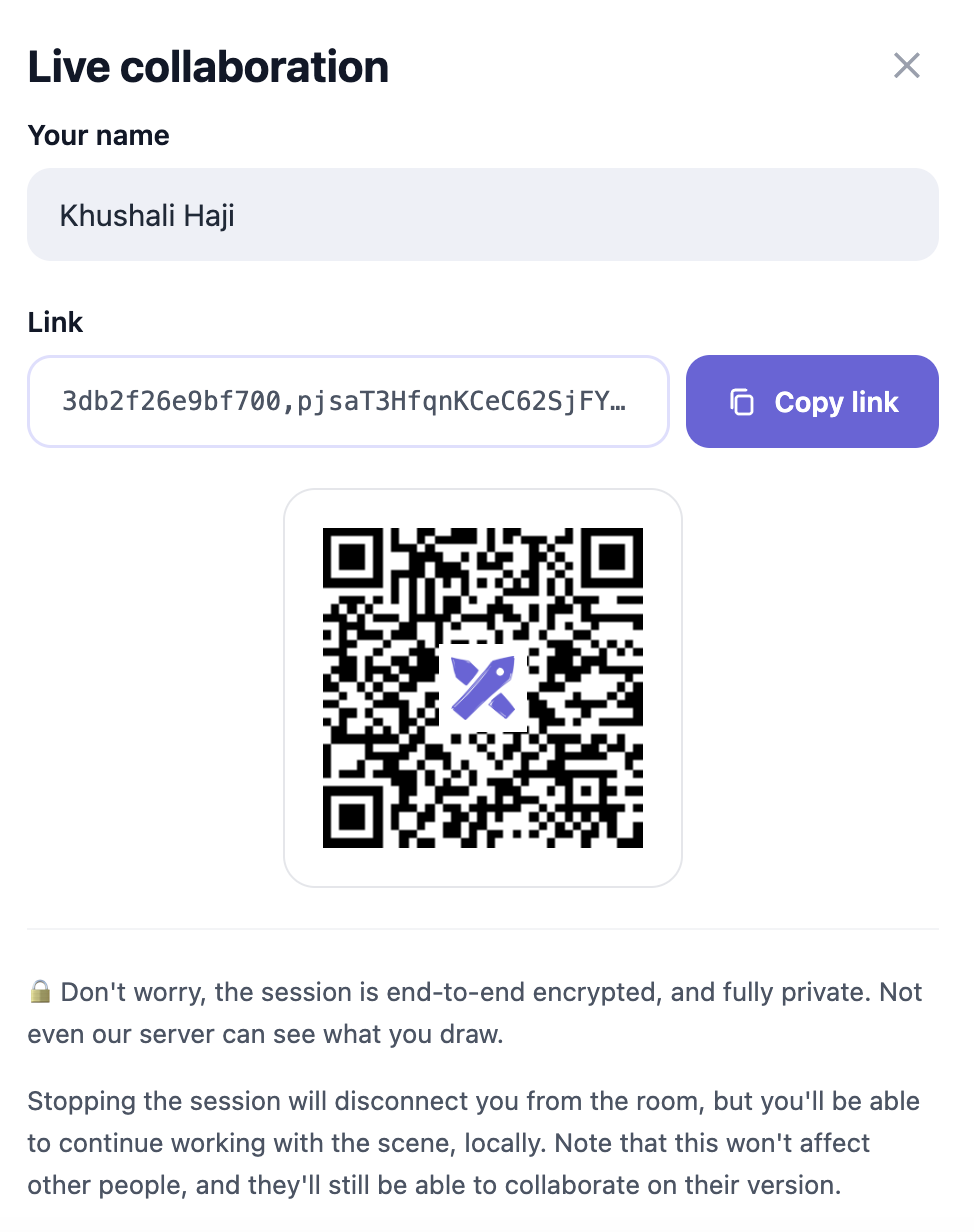
The QR code stays a quiet, secondary signal. The logo goes on the existing collaboration
QR code instead of a new branding surface, so it reaches a real touchpoint without a new element to
dislike.
The Excalidraw logo, added to the existing live collaboration QR code.
One survey question at a time. All four at once feels longer, and the target is 30
seconds.
Ask once per opt-out, not per export. Someone exporting 20 times is one data point, not
twenty.
Aspect ratio grows the canvas, never crops. Cropping could cut off the user's own
content.
04 · Building It
Building with an AI coding pair
The implementation was coded with Claude Code, while the team directed and oversaw the product decisions, the
design review, and the QA. Each result was checked on a local dev server before it was committed.
The scope and the trade-offs were fixed before any code was written.
Bugs found in review
Bug
The mark rendered in the middle of the image, and too small, instead of the
bottom-right corner.
Cause and fix
The canvas was already scaled by the renderer, and the new mark code scaled it a
second time. Fixed by drawing inside the context that was already scaled.
Bug
The mark got cropped off on small or tightly zoomed exports.
Cause and fix
The margin reserved for the mark was a guessed fixed size, too small for the mark
it needed to hold. Fixed by computing the margin from the mark's real size, with a clamp so it can never
land off-canvas.
Testing has a real limit since the test environment cannot rasterize a canvas, so pixel position bugs like these
cannot be caught by an automated test alone. They were verified visually myself, using the SVG output, which can
be inspected directly
05 · Teamwork
Version Control in a Shared Repo
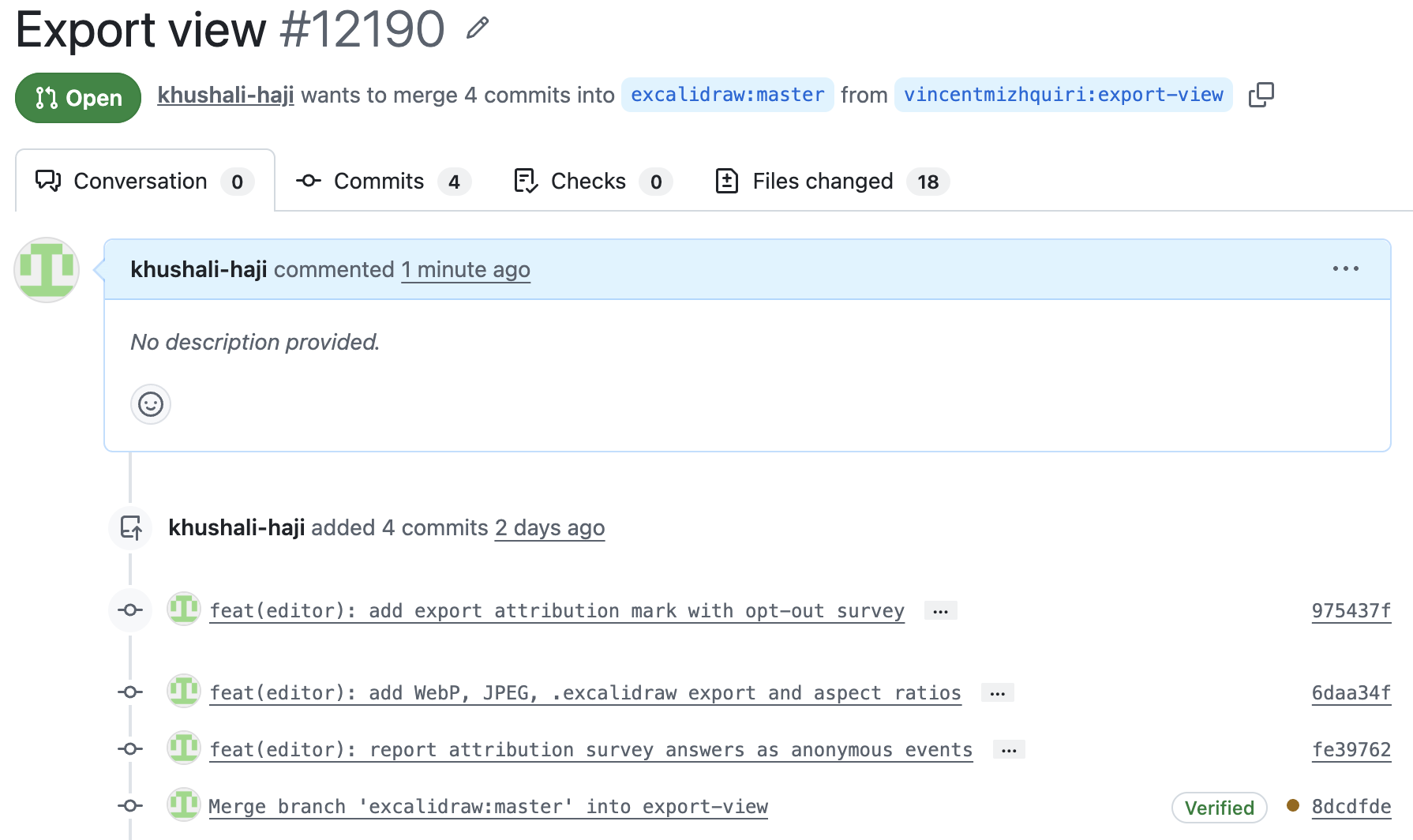
The work landed as three commits on one branch, in one pull request. Three teammates worked on their own
branches in the same repository, so we kept each unit small and checked what others were building before
starting the next one.
The commits are ordered by dependency: mark and opt-out first, then export formats, then survey reporting.
Each one was typechecked, linted and tested when it was made, so any commit can be reviewed alone or undone
with git revert without breaking the others.
QR code logo, branded export filenames, file-type icon branding
Richard T.
Export analytics dashboard
Vincent M.
Live-sync embed with attribution, deployment configuration
The pull request on GitHub. The fourth commit is a merge of master into
the branch, to keep it current.
06 · Results
What Shipped
What's built: a default attribution credit on PNG, JPEG, WebP, and SVG exports and on copy-paste, a
hide-attribution toggle gated by the survey with a 30-day expiry, a redesigned export dialog with more
formats, and an aspect ratio picker. Survey answers are reported as anonymous analytics events.
3Commits, one PR
18Files changed
28New tests
0Existing tests broken
What is not proven yet: there was no attribution baseline before this work, so I cannot say the KPI moved, only
that it
can now be measured. The analytics dashboard built by team still runs on mock data, and is not yet connected.
Cross-browser testing is yet to be reviewed, since the mark uses canvas features that can vary between browsers.
What we'd do differently
Set up cross-browser testing earlier. Unit tests cannot catch canvas rendering bugs at the pixel level.
Agree on the measurement plan with the dashboard owner from day one, so the events and the dashboard get
designed together instead of connected after the fact.
Ship the KPI baseline before the feature. The brief itself said instrumentation was a prerequisite, and the
feature was built before there was anything to measure it against.